LinkedIn Ads for B2B let you put your message in front of people by job function, seniority, industry, company size or even a list of named companies, and you pay for that attention through an auction. A beginner’s best path is straightforward: check whether your numbers can support LinkedIn’s costs, build an audience big enough to learn from, start with one clear offer, track leads through to your CRM, and give the campaign 60 to 90 days before judging it.
This guide follows that order. Platform rules come from LinkedIn’s own Help pages wherever possible, and India-specific points are flagged. LinkedIn changes its interface and formats often, so confirm the exact options in your Campaign Manager account before you spend.
Are LinkedIn Ads Right for Your B2B Business?
They fit best when you sell to professionals you can describe by role and company, when one customer is worth enough to pay for many leads, and when someone will follow up quickly. Straight North, a US agency, makes a similar point: LinkedIn suits companies with a defined audience, a sales cycle that benefits from relationship-building and enough margin to justify a higher cost per lead.
Use this quick test.
| Signal | Good fit | Think twice |
|---|---|---|
| Who buys | Buyers can be defined by role, industry and company | Buyers are consumers, or “any business owner” |
| Deal value | One customer is worth many times your cost per lead | Low-ticket or one-off sales |
| Audience size | Your targeting leaves at least tens of thousands of people, or you have a named-account list | A very narrow niche that falls below LinkedIn’s minimum |
| Sales follow-up | Someone calls or messages new leads within a day | Leads sit in an inbox for a week |
| Offer | You have something worth sharing contact details for (guide, webinar, quote tool) | Your only call to action is “Contact us” |
How Much Can You Afford to Pay for a Lead?
Work backwards from what a lead is worth. The numbers below are hypothetical, to show the method, not benchmarks.
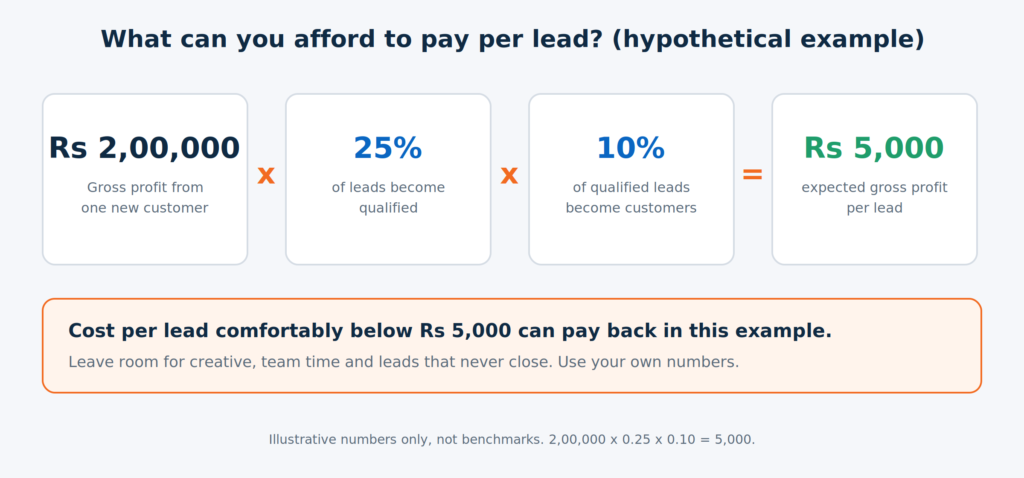
In this example, any cost per lead comfortably below ₹5,000 can pay back, and you should leave room for creative production, your team’s time and the leads that never close. Replace each number with your own history. If you can’t estimate them yet, treat your first 90 days as the way to find out.
How Do LinkedIn Ads Work?
You need a LinkedIn Company Page and a Campaign Manager account, which is LinkedIn’s self-serve ad tool. Inside it you create a campaign, choose an objective, build an audience, pick an ad format, set a budget and bidding strategy, and publish. Your ads then compete in an auction against other advertisers targeting similar people. LinkedIn says what you’re charged depends on your optimization goal and bidding strategy, while the cost of your ads is set by the auction.
LinkedIn groups objectives into three stages: awareness, consideration and conversions. Straight North suggests beginners begin with a consideration objective such as website visits or engagement to test the waters. A more useful rule is to choose the objective that matches the first thing you can actually measure. If you have a lead magnet, a Lead Gen Form and a CRM ready, start with lead generation. If your tracking isn’t ready, fix that first (see the tracking section below).
LinkedIn’s India base is large. According to LinkedIn’s India country manager, speaking to PTI in September 2025, India has more than 160 million members and nearly 30% of them work in small and medium businesses. Registered members aren’t the same as active buyers, though. What matters for you is how many of your buyers you can reach, and Campaign Manager’s audience counter tells you that before you spend anything.
Which LinkedIn Ad Format Should You Start With?
Start with one feed format and one offer, and add others once you have data. Formats and names change, so check what your account offers.
| Format | What it does | Beginner note |
|---|---|---|
| Single image | One image, headline and intro text in the feed | The simplest way to test an offer |
| Carousel | Swipeable cards in one ad | Good for step-by-step or multi-point stories |
| Video | A short video in the feed | Needs production, but suits explaining a process or product |
| Document | A document preview, often gated behind a form | Works for guides, checklists and reports |
| Thought Leader | Promotes a real post from a person, not just a brand page | Useful when a founder or expert already posts well |
| Event | Promotes a LinkedIn Event with registration from the ad | Webinars and workshops |
| Conversation | Message with branching buttons | Needs careful scripting, best for warm audiences |
| Message | A single direct inbox message | Easy to get wrong if the audience or offer isn’t relevant |
| Lead Gen Form | A native form layered onto supported ads | Pre-fills from the member’s profile, so completion is typically easier |
For most beginners, a single image or document ad paired with a Lead Gen Form is a sensible first test. Straight North notes that offering something useful, such as a guide, a webinar or a free assessment, outperforms leading with a hard sell.
How Do You Build the Right Audience?
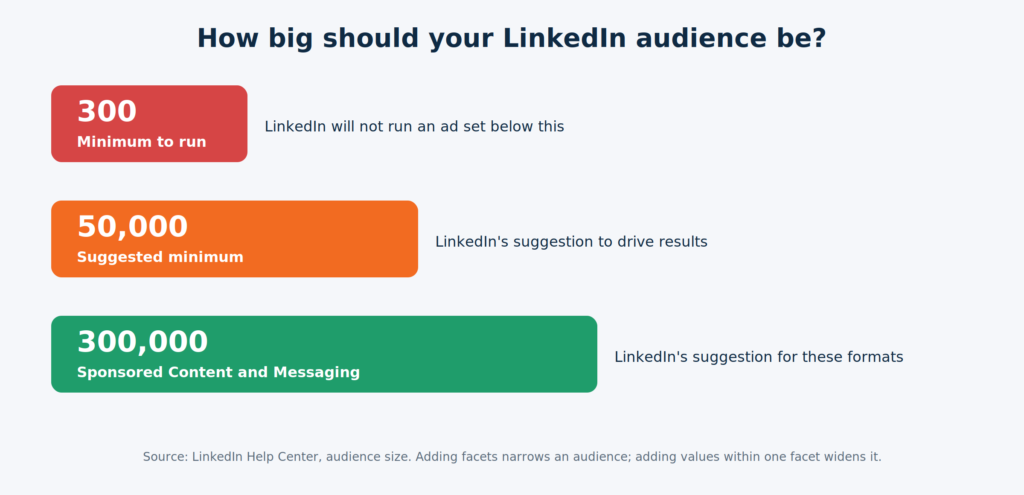
The way you combine targeting matters:
- Several values in one facet widen the audience. Selecting multiple job titles means members can match any of them.
- Adding another facet narrows it. A member must match one attribute from each facet you include, so stacking location, industry, seniority and company size can shrink the audience quickly.
- Exclusions narrow it further.
- Mixing different Matched Audience types narrows it. A member must match both a website audience and a company list, for example.
A hypothetical India example: a supplier of industrial automation wants plant and operations managers in Delhi NCR manufacturing companies. A sensible first build is location (Delhi NCR), job function (operations, engineering), seniority (manager and above) and industry (machinery, automotive). If the counter shows a small audience, don’t keep adding facets. Loosen one, such as widening location to north India, and check the number again.
If your audience is small by nature, use a company list instead of broad attributes. LinkedIn’s account targeting checklist says to upload a CSV with a single column headed “companyname”, and that the matched segment needs at least 300 members before the campaign can run. This is the core of account-based marketing, which we explain in our guide to account-based marketing.
Retargeting uses visitors collected by the Insight Tag, which means you need website traffic first. A low-traffic site may take a long time to reach audience minimums, so don’t plan on retargeting in week one.
Which Bidding Strategy Should a Beginner Choose?
LinkedIn offers three strategies. Maximum delivery is automated: it spends your budget, charges by impressions (CPM), and you can’t set a bid. When you launch, the ad set enters a learning phase while the system gathers auction data. Cost cap also charges by impressions: you set a target cost per key result and LinkedIn tries to keep the average under it. Manual bidding lets you set the maximum bid yourself, and for cost cap or manual bidding Campaign Manager shows a recommended bid range.
LinkedIn itself recommends starting with maximum delivery, particularly if you want to spend your full budget. Some specialist ABM practitioners disagree for small audiences, arguing manual bidding gives more cost control. Their view comes from firms that sell LinkedIn services, so treat it as one input, not a rule.
A practical way to settle it:
- Large audience, lead generation goal: begin with maximum delivery, as LinkedIn suggests, and review cost per lead weekly.
- Small or named-account audience: run a split test. Put most of the budget on one strategy and a small share on manual bidding with a bid inside the suggested range, then compare cost per result and delivery.
- Either way, avoid changing audience, bids and creative all at once, or you won’t know what caused a result.
How Much Should You Budget?
Budget enough to get a clear answer, not just enough to switch the campaign on. LinkedIn’s best-practice page states the minimum daily budget is $10 for any ad format, and the minimum lifetime budget for a new campaign is $100. Check the equivalent in your account currency in Campaign Manager. Two details catch beginners out:
- Daily budget is an average. LinkedIn says daily spend can be up to 50% higher than the amount you enter, and a campaign won’t spend more than seven times its daily budget in a week.
- Card billing happens in thresholds. When you start with a credit card, LinkedIn’s initial payment threshold is $100 (it may vary for other currencies). Monthly invoicing is available if you meet LinkedIn’s conditions, which at the time of writing include spending at least $3,000 in each of two consecutive months.
On cost, Straight North, a US agency, reports cost per click typically ranging from $5 to $15 or more, and suggests most B2B campaigns need at least $1,000 to $2,000 per month to produce meaningful data. These are US-agency figures. Your costs in India will differ by audience and competition, so use the bid range and forecast Campaign Manager shows for your actual audience rather than borrowing a number from a blog post, including this one.
A simple way to set a budget: decide how many qualified leads you need per month, multiply by the cost per lead you can afford (from the break-even table above), and see if the total is realistic. If it isn’t, narrow the goal to fewer accounts rather than spreading a small budget across a large audience.
What Should Your Ads Say?
Match the offer to how ready the buyer is. LinkedIn’s brand-building guide, citing the B2B Institute’s 95-5 rule, says about 95% of your target B2B buyers aren’t in the market to buy right now. If every ad says “Book a demo,” you’re talking to the 5% and ignoring the rest.
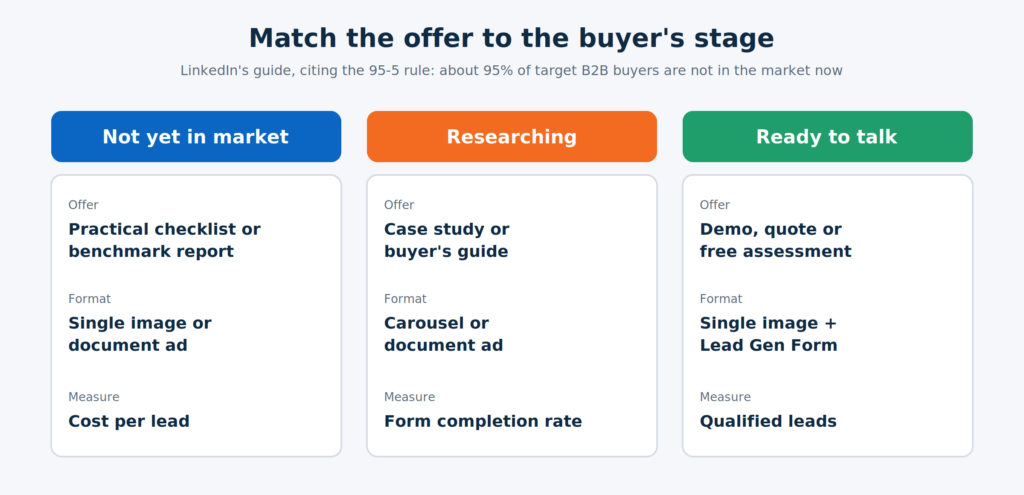
Copy and creative principles that hold up:
- Lead with the benefit. Professionals scroll quickly, so the first line should say what they’ll get.
- One offer and one call to action per ad.
- Send traffic to a page built for the offer, not your homepage, or use a Lead Gen Form.
- Test, but sensibly. LinkedIn’s own guidance suggests four or five ads per ad set to see which resonates.
Lead Gen Form or landing page? Lead Gen Forms pre-fill from a member’s profile, which usually lifts completion rates. The trade-off is that easy forms can bring lower-intent leads. A sensible fix is one qualifying question, such as company size or timeline, so your sales team can sort leads quickly. If you need a page, build it for speed and clarity, and keep the form short.
How Do You Track Whether LinkedIn Ads Work?
Set up tracking before you launch, and measure beyond the form fill. LinkedIn’s Help Center lists four conversion data sources: the Insight Tag, the Conversions API, CRM-based conversions and CSV upload. It also notes that using the Conversions API together with the Insight Tag gives a more complete view of conversion tracking.
A workable setup:
- Install the Insight Tag on your website. It supports conversion tracking and retargeting, and the audience data it gathers becomes more useful the longer it runs.
- Define your conversions in Campaign Manager: a lead form submission, a thank-you page visit, a demo request.
- Connect CRM data through the Conversions API, CRM sync or periodic CSV upload so that qualified leads and closed deals feed back. LinkedIn also supports optimizing lead generation ad sets for qualified leads once your account meets its requirements.
- Use UTM parameters on every link so your analytics and CRM show the source.
- Test it: submit a test lead and confirm it appears in Campaign Manager, your CRM and your analytics once each.
For metrics, Straight North recommends watching click-through rate, cost per lead, form completion rate and, most importantly, the quality of leads entering your pipeline. LinkedIn usually works earlier in the buying cycle than search, so attribution can be slow. Straight North suggests allowing 60 to 90 days before drawing conclusions.
In India, one more habit matters: speed to lead. Whoever gets the lead should call or message within hours. A fast, personal follow-up often decides whether an expensive lead turns into a meeting.
What Does a Sensible First 90 Days Look Like?

Before you scale, check three things: cost per qualified lead against your break-even number, whether sales rates the lead quality, and whether results hold for more than one or two weeks.
Which Beginner Mistakes Waste the Most Budget?
- An audience that’s too narrow. Below 300 members, LinkedIn won’t run the campaign, and audiences well under 50,000 often struggle to learn.
- Funding it at the minimum and expecting results. The minimum lets you start. It doesn’t give you enough data to learn.
- Sending clicks to the homepage. A cold visitor needs the offer, not a menu.
- Judging at two weeks. The sales cycle, not the dashboard, decides how soon results show.
- Counting leads instead of qualified leads. Cheap leads that sales ignores are the most expensive ones.
- Only running bottom-of-funnel offers. The 95-5 rule says most of your market isn’t ready. Give them something useful first.
- Slow follow-up. A lead contacted after three days is a cold lead.
Conclusion
LinkedIn Ads reward preparation more than they reward budget. Work out what a lead is worth, build an audience large enough to learn from, pick one useful offer, track leads through to your CRM, and give the campaign 90 days. Do those five things and the platform’s higher costs become a number you can judge, not a fear.
If you’d rather have specialists plan the audience, tracking and budget with you, a performance marketing agency can set up and run the first campaign while your team focuses on follow-up. For lead qualification once leads start arriving, see our guide to lead scoring in HubSpot and Zoho.