Four forces that decide inbox or spam: authentication, reputation, engagement and content Mailbox providers weigh authentication, sender reputation and engagement most. Content still matters, but less.
Campaigns land in spam when mailbox providers don’t trust the sender. Zoho’s deliverability guide boils the causes down to weak authentication, a poor sender reputation, low recipient engagement and unwanted content. This email deliverability checklist takes them in the order that fixes problems fastest: confirm where your mail is going, authenticate your domain, bring complaints down, clean your list, warm up new senders, check your content, earn engagement and monitor on a routine.
One thing has changed recently that older checklists miss. Since November 2025, Gmail has been ramping up enforcement, and mail that fails the sender requirements can now be temporarily or permanently rejected instead of quietly filed in spam. Microsoft began rejecting non-compliant high-volume mail to Outlook.com, Hotmail and Live addresses from May 2025. So the first question is no longer only “why is my email in spam?” It’s also “is it being delivered at all?”
First, Where Is Your Email Actually Going?
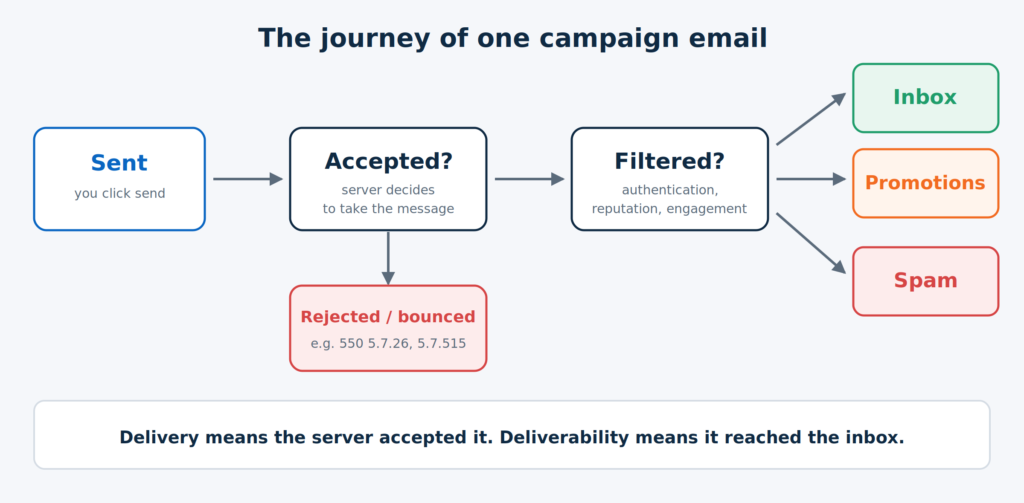
Work out which problem you have before you fix anything. Email deliverability means landing in the recipient’s primary inbox, not just being accepted by their server. As Zoho’s CRM documentation puts it, the risk is being sidelined to spam or bouncing back undelivered. Those are different failures with different fixes.
Journey of a campaign email from send to inbox, spam or rejection Sent is not the same as delivered, and delivered is not the same as in the inbox.
Use this table as a first diagnosis.
| What you see | What it usually means | Check first |
|---|---|---|
| Bounce or error 550 5.7.26 from Gmail | Gmail blocked mail from an unauthenticated sender | SPF, DKIM and DMARC (Step 1) |
| Bounce 550 5.7.515 from Outlook.com, Hotmail or Live | Microsoft’s high-volume authentication requirement isn’t met | SPF, DKIM and DMARC alignment (Step 1) |
| Temporary 4xx errors or slow delivery | Throttling, often tied to volume or reputation | Slow down, check complaints (Steps 2 and 4) |
| Delivered, but in spam at Gmail only | A Gmail-specific reputation or engagement problem | Postmaster Tools spam rate (Step 2) |
| In spam at every provider | Authentication, list quality, blocklist or content | Steps 1, 3 and 5 |
| In the Promotions tab | Not spam. Gmail sorted it as promotional | Step 5 and Step 6 |
| Only new sends from a new domain | No reputation yet | Warm-up (Step 4) |
The error codes in the first two rows come from Microsoft’s support page and from Google’s SMTP reference as quoted by email providers. Your sending platform’s bounce log shows the exact code.
What Changed Between 2024 and 2026?
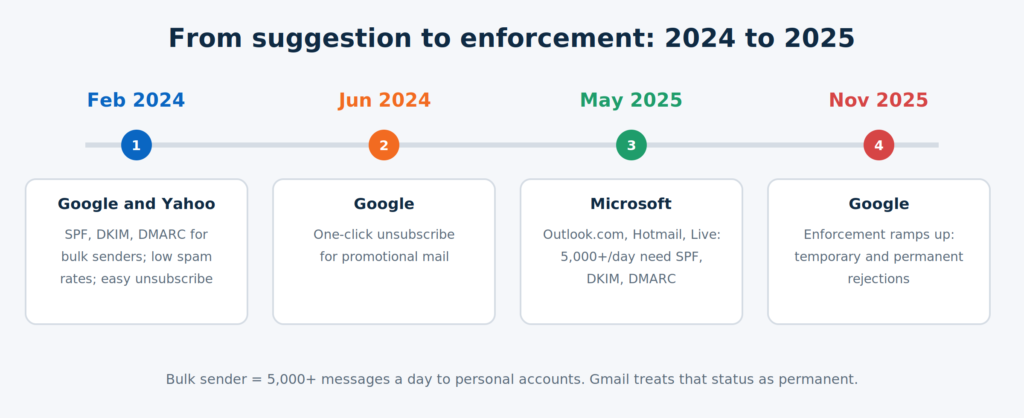
The rules for bulk senders tightened in stages, and the final stage is now in force.
Timeline of Gmail, Yahoo and Microsoft sender requirements from February 2024 to November 2025 Authentication, easy unsubscribe and low complaints are now enforced, not suggested.
- February 2024: Google and Yahoo began requiring SPF, DKIM and DMARC from bulk senders, easy unsubscription and low spam rates.
- June 2024: the one-click unsubscribe requirement for promotional mail came into force.
- May 5, 2025: Microsoft began enforcing authentication for domains sending 5,000 or more emails a day to its consumer mail services, initially routing non-compliant mail to Junk and later rejecting it with error 550 5.7.515.
- November 2025: Google said it was ramping up enforcement, with temporary and permanent rejections for messages that fail its requirements.
A few details matter. A “bulk sender” at Gmail is anyone who has sent 5,000 or more messages in a day to personal Gmail accounts, and Google’s FAQ says that status is permanent once reached. The authentication rules apply to every sender, while bulk senders have extra requirements for DMARC alignment, spam rate and one-click unsubscribe. Even if you send far fewer than 5,000 emails a day, treat the requirements as your baseline. They’re the same signals that feed reputation at every volume.
Step 1: Is Your Domain Authenticated?
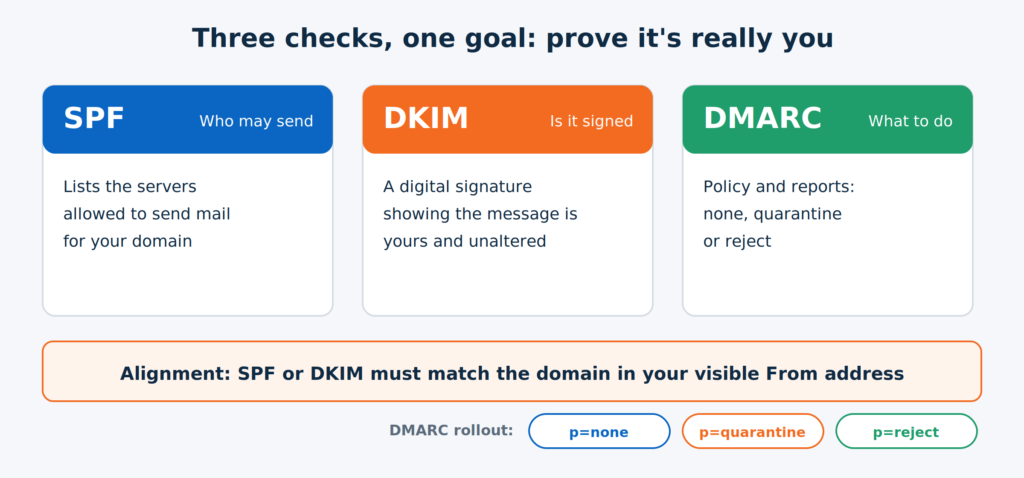
Authenticate every domain you send from, then confirm that the checks align with your visible “From” address. This is the single most common fix, and it’s the one providers now enforce.
SPF, DKIM and DMARC explained as three checks that must align with the From domain Two of the three must line up with your From domain. DMARC is the policy that tells providers what to do.
| Record | What it does | What “pass” looks like |
|---|---|---|
| SPF | Lists the servers allowed to send for your domain | The sending service is included, and the record stays within SPF’s 10 DNS-lookup limit |
| DKIM | Adds a digital signature that proves the message wasn’t altered and belongs to your domain | A valid signature on your own domain, not only your ESP’s |
| DMARC | Sets the policy and reporting layer on top of SPF and DKIM | A published record, at least p=none, with SPF or DKIM aligned to the From domain |
Zoho advises starting DMARC at p=none, then moving toward p=quarantine or p=reject once you’re confident everything legitimate passes. Microsoft’s support page gives the minimum for high-volume senders: SPF and DKIM must pass, and a DMARC record must exist and align through SPF, DKIM or both.
How to check it yourself: send a test to a Gmail account, open the message, choose “Show original,” and confirm that SPF, DKIM and DMARC all say PASS.
Common causes of failure, particularly in India:
- Several tools send from one domain. Your CRM, ESP, website forms and invoicing software each need authorizing. Adding an “include” for every tool can push SPF past its 10-lookup limit, which breaks it.
- Only the ESP’s domain is authenticated. If your DKIM signs with the platform’s domain instead of yours, alignment can fail. Authenticate your own domain inside your ESP. Zoho Campaigns, for one, notes that campaigns from a sender domain that hasn’t been authenticated in its system are more likely to land in spam.
- Sending from a free address. Run campaigns from a domain you own, not a free Gmail or Yahoo address.
- DNS edited in the wrong place. Records must be added where your domain’s DNS is actually hosted, which may be your registrar or hosting provider and not your website host.
Step 2: Are Unsubscribes Easy and Complaints Low?
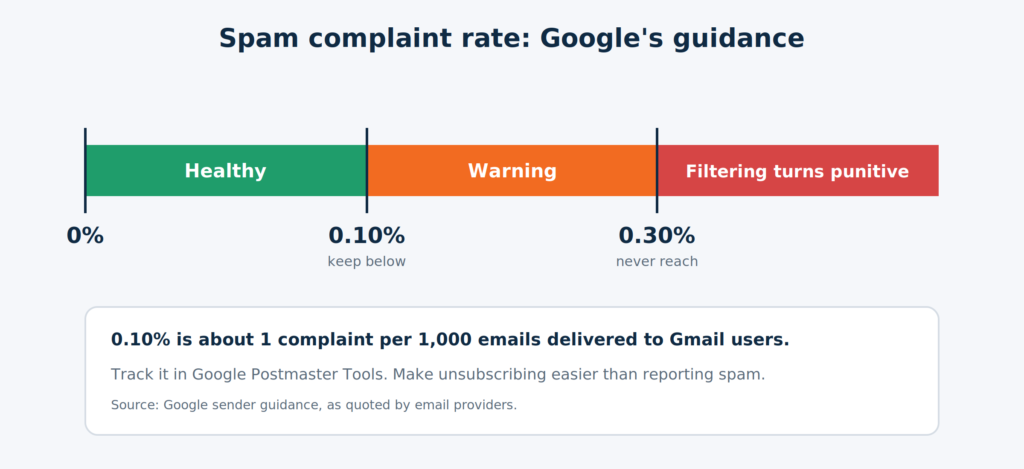
Make leaving easy, so people don’t hit “Report spam” instead. Google tells senders to keep the spam rate reported in Postmaster Tools below 0.10% and never reach 0.30% or higher.
Spam complaint rate gauge: below 0.10% target, never reach 0.30% These thresholds are Google’s guidance for Gmail. A rate near 0.30% is where filtering turns punitive.
For scale, 0.10% is about one complaint for every 1,000 emails delivered to Gmail users. That sounds small, and it is the point. A single poorly targeted campaign can cross it.
What to do:
- Include one-click unsubscribe for marketing and subscribed mail. It uses two headers defined in RFC 8058 (
List-UnsubscribeandList-Unsubscribe-Post), and bulk senders must honor requests within two days. Most ESPs add this for you, so check your platform’s settings and send yourself a test. - Keep a visible unsubscribe link in the email body too.
- Set up Google Postmaster Tools for your sending domain and read the spam rate regularly. Zoho also points to Microsoft SNDS for monitoring Microsoft’s side. Postmaster data is aggregated and can lag, so look for trends, not single-day readings.
- Offer a preference choice (topics or frequency) where you can. Zoho notes that flooding recipients or abandoning them both increase complaints.
Step 3: Is Your List Clean and Consented?
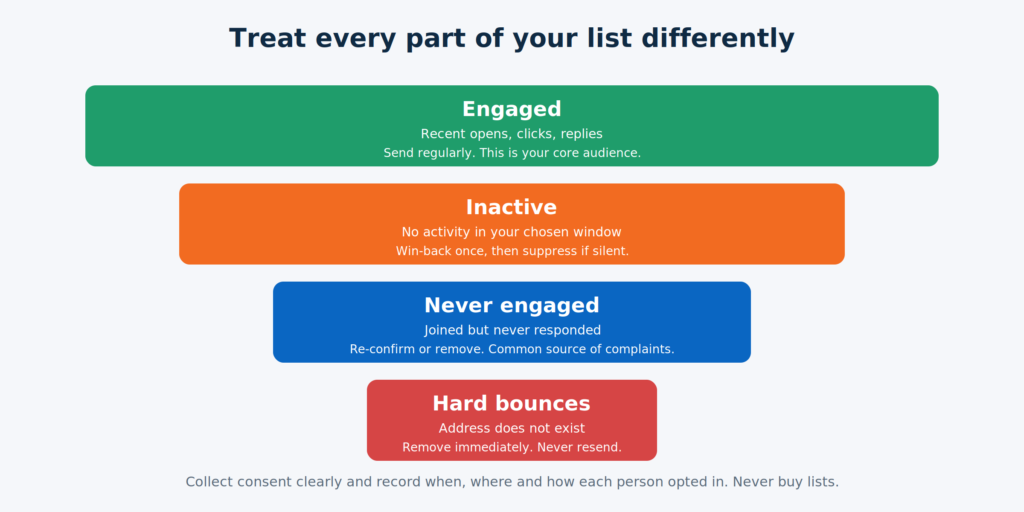
Send only to people who asked to hear from you, and remove addresses that hurt you. Zoho is direct about the risks: emailing people who haven’t opted in damages your domain reputation, purchased lists can contain spam traps, and unclean lists create bounces and complaints. It recommends double opt-in contacts.
List hygiene funnel: engaged subscribers, inactive subscribers, never engaged and hard bounces Treat each group differently. Send to the engaged, re-engage or suppress the inactive, and remove bounces.
A practical routine:
- Collect consent clearly. Say what they’ll receive and how often, and record when, where and how each person opted in.
- Never buy or rent lists. Apart from deliverability, you can’t prove consent.
- Remove hard bounces immediately and review soft bounces that repeat.
- Segment by engagement. Define “inactive” in a way that fits your frequency. For a monthly newsletter, six months without an open or click might be your cut-off. That figure is an example, not a rule.
- Re-engage once, then suppress. A short win-back sequence can recover some people. Our guide to win-back email campaigns explains how, and those who still don’t respond should be suppressed. Zoho warns that mailing people who stopped engaging months ago drags down signals for your whole list.
- Watch how you collect addresses in India. Lists built from event badge scans, visiting cards, WhatsApp groups or scraped LinkedIn profiles are common and risky: they carry complaints, and consent is hard to prove. India’s Digital Personal Data Protection Rules were notified on 13 November 2025 and phase in over roughly 12 to 18 months, with law-firm analyses pointing to clear, standalone consent notices and a way to withdraw consent. Keep consent records now. This is general information, not legal advice, so confirm what applies to you with a lawyer.
Step 4: Are You Warming Up and Pacing New Senders?
A new domain or IP has no history, and providers treat the unknown with suspicion. Litmus notes that ISPs may suspect a new IP address or domain unless you warm it up properly, because spammers churn through them.
Warm-up in practice:
- Start small and with your most engaged contacts, the people most likely to open, click or reply.
- Increase volume gradually instead of sending your whole list on day one.
- Keep a steady rhythm. Zoho warns that going silent for months and then blasting a large send raises complaints, as does sending too often.
- Add new segments only once earlier sends show healthy engagement and complaints.
On shared and dedicated IPs: Zoho Campaigns sends from its own IPs by default and offers a dedicated IP as an option, and you can’t use both at once. As a practitioner view, lower-volume senders are usually better served by a reputable shared IP, while a dedicated IP only helps if you send enough, and consistently enough, to build its own reputation. Check your ESP’s guidance for your volume.
Step 5: Does the Email Itself Deserve the Inbox?
Content is the smallest of the big factors, but it can still tip a borderline send. Zoho says content still plays a part but a smaller one than it used to, and that a single trigger word won’t send a well-authenticated, well-engaged sender to spam. Litmus goes further and calls spam trigger words mostly a deliverability myth, noting that words matter mainly when your sender reputation is already poor.
What filters and reviewers do look at, according to Zoho and Litmus:
| Check | Why it matters | Pass looks like |
|---|---|---|
| Message is mostly an image | Image-heavy messages with little text are a recognised spam pattern | Real text carries the message, images support it |
| Links | Suspicious or blocklisted links can hurt a message | Links go to your own, working domain. Avoid link shorteners |
| Sender identity | A sender address that doesn’t match the sender name looks suspicious | Consistent From name and address, and a monitored reply address |
| Formatting | Zoho’s review team flags mixed font sizes and colours in one line | Clean, consistent formatting |
| Subject line | Misleading or shouting subjects raise complaints | Honest, specific, no ALL CAPS or excess punctuation |
| Plain-text version | A missing text part is a common content flag | A text version included alongside the HTML |
Test before you send. Litmus’s spam testing runs an email against 20 or more checks, including authentication and several filters. A lower-tech alternative from Klaviyo’s help documentation is iterative: build the email up in stages with test sends to see which element causes the problem.
If you’re writing subject lines, our guide to email subject lines that get opened covers the craft.
Step 6: Are People Engaging With Your Emails?
Filters learn from what recipients do, so write mail people want. Litmus says spam filters now look at how subscribers engage: opening, replying, forwarding or marking “not spam” count as positive, while hitting spam, or deleting without reading, counts as negative. Zoho adds that adding a sender to contacts makes spam classification less likely.
Ways to earn engagement:
- Ask for a reply or a contact-list add in your welcome email, for example by asking a simple question that’s easy to answer.
- Segment and personalize so each group gets relevant content. Our drip campaign guide shows how to build sequences that match behaviour.
- Judge success on clicks, replies and complaints, not only opens. Apple’s Mail Privacy Protection has made open rates less reliable, a topic Litmus maintains a resource hub on.
- Send only what you’d want to receive. If a campaign’s goal is only “stay visible,” it probably won’t help your reputation.
Step 7: Are You Monitoring on a Routine?
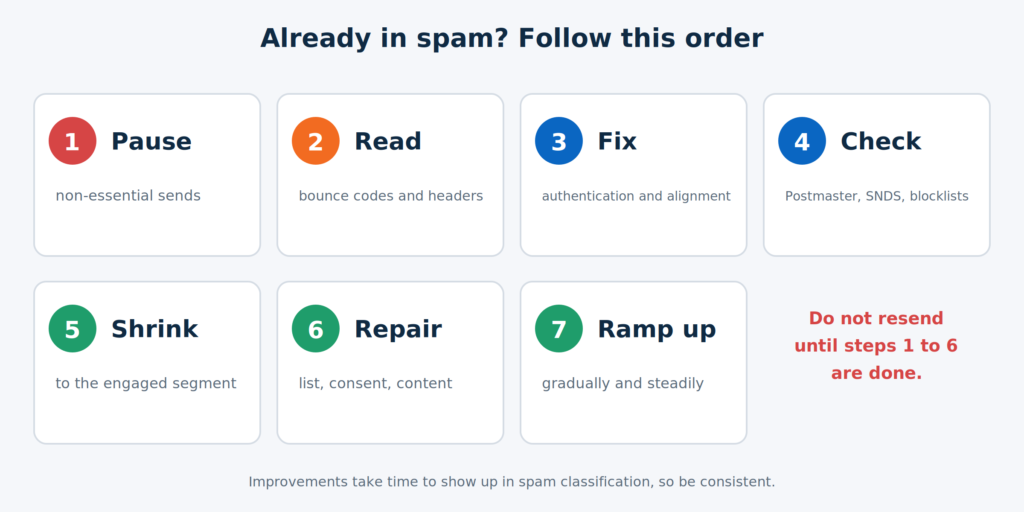
Deliverability isn’t a one-time setup. Providers’ views of you change as your list, volume and content change.
Four rhythms for deliverability checks: one-time setup, every send, weekly, monthly Group the checks by how often they need doing, and put them in a calendar.
| Rhythm | What to check |
|---|---|
| One-time setup | SPF, DKIM, DMARC, one-click unsubscribe, Postmaster Tools and SNDS enrolment, consent record process |
| Every send | Test email to Gmail, Outlook and Yahoo accounts, links, text version, spam test, segment is engaged |
| Weekly | Bounces, complaints, spam rate trend, blocklist check, replies |
| Monthly | Authentication still passing after tool changes, suppress inactive contacts, review DMARC reports, review which segments are sending |
What If You’re Already Landing in Spam?
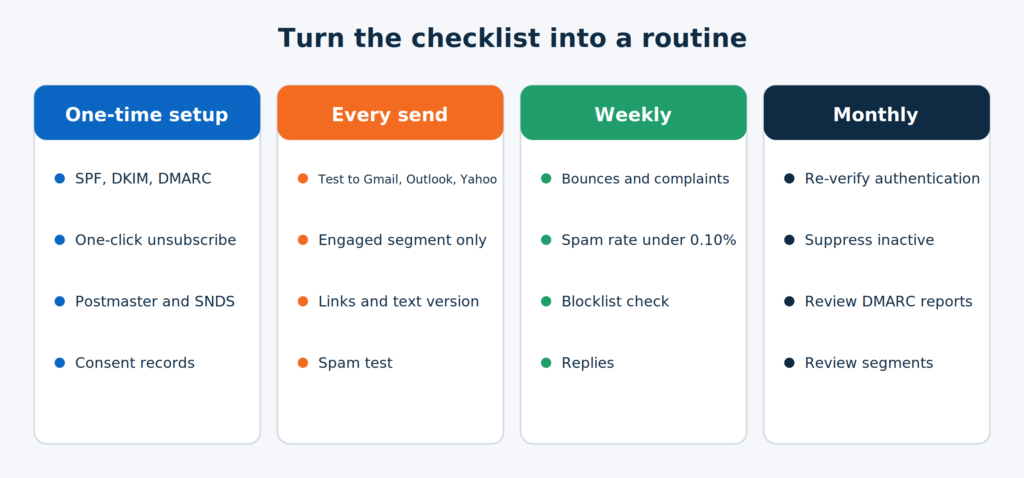
Stop the damage first, then fix the cause, then rebuild trust slowly.
Seven-step recovery plan for emails landing in spam Recovery is a sequence. Skipping straight to resending is the most common mistake.
- Pause non-essential sends. Every additional spam-folder send adds to the problem.
- Read the evidence. Check bounce codes and the full message headers. If you can’t tell, Zoho suggests sending the headers of an email that hit spam to your ESP’s support team.
- Fix authentication and alignment if anything failed (Step 1).
- Check reputation tools and blocklists. Zoho advises monitoring with Google Postmaster Tools and Microsoft SNDS, and requesting removal from any blocklist that lists you, after fixing the underlying cause.
- Shrink to your most engaged segment and resend only valuable emails.
- Fix the root cause, whether it’s list quality, consent, frequency or content.
- Ramp back up gradually. Google’s guidance notes it can take time for spam rate improvements to show up in spam classification, so be patient and consistent.
Which Mistakes Cause Most Spam-Folder Problems?
- Authenticating the ESP’s domain but not your own.
- Adding tools to your domain without updating SPF, or adding so many that SPF breaks.
- Sending a big blast after months of silence.
- Using purchased or scraped lists.
- Hiding the unsubscribe link, which turns unsubscribes into spam reports.
- Judging only on open rate.
- Ignoring Microsoft and Yahoo because most of your list uses Gmail.
- Treating deliverability as a project instead of a routine.
The Email Deliverability Checklist: One-Page Version
One-time setup
- SPF, DKIM and DMARC published, aligned with your From domain
- Sending from your own domain, not a free address
- One-click unsubscribe working and tested
- Google Postmaster Tools and Microsoft SNDS set up
- Consent captured and recorded at sign-up (double opt-in preferred)
Before every send
- Test sent to Gmail, Outlook and Yahoo, authentication shows PASS
- Sending to an engaged segment only
- Links work and point to your own domain
- Text version included, image-to-text balance sensible
- From name, address and reply address consistent and monitored
- Spam test run
Weekly
- Hard bounces removed
- Spam rate under 0.10% and trending down
- No new blocklist entries
Monthly
- Authentication re-verified after any tool change
- Inactive contacts re-engaged or suppressed
- DMARC reports reviewed and policy tightened when ready
Conclusion
Most spam-folder problems come down to trust. Authenticate your domain so providers know it’s you, keep complaints low by making unsubscribing easy and sending to people who asked, and give them content they want. Then treat the checks as a routine rather than a rescue mission.
If you’d rather have a team set up authentication, clean the list, build the automations and monitor deliverability for you, Growthkul’s Email Marketing & Automation service covers it. For lead scoring on the leads your emails bring in, see our guide to lead scoring in HubSpot and Zoho.