A useful e-commerce website design checklist tells you what to fix first, not just what exists. Start with the checks that decide whether someone can complete a purchase and trust you enough to do it: total cost visibility, a short checkout, the right payment options, visible trust signals and mobile speed. Product pages, navigation and search come next. Analytics, testing and polish can follow launch.
The reason to work in that order is in the data. Baymard Institute’s compilation of 50 studies puts average cart abandonment at about 70%. Much of that is unavoidable: in its latest survey, 42% of US shoppers said they abandoned a cart because they were just browsing. The rest is mostly design. Extra costs, slow delivery, distrust of the site, forced account creation and long checkouts are all things a design team can fix.
One caution before you start. Baymard’s survey covers US shoppers, so treat the percentages as directional for India. The patterns hold, but Indian checkout has its own realities (UPI, cash on delivery, pincode serviceability), and this checklist covers them.
How Should You Use This E-commerce Website Design Checklist?
Work through it in three tiers, and don’t start a tier until the one above is done.
| Tier | What it covers | Rule |
|---|---|---|
| Tier 1: Launch-blockers | Total cost, checkout length, payments, trust and legal display, mobile speed, form basics | If one fails, don’t launch |
| Tier 2: Conversion boosters | Navigation, search, product pages, category pages, cart | Fix before spending on ads |
| Tier 3: Growth layer | Measurement, search visibility, post-purchase, testing | Build in the first 90 days |

A hypothetical example shows why the order matters. Say a store spends a month on a cinematic homepage banner and ships a default checkout with a mandatory account step and shipping charges revealed on the last screen. The homepage will earn compliments. The checkout will quietly lose buyers. Tier 1 exists to stop that.
Tier 1: Which Checks Decide Whether Anyone Can Buy?
Do You Show the Full Price Before the Last Step?
Show shipping, taxes and any COD or handling fee on or before the cart page. Unexpected extra cost is the biggest fixable reason people leave. In Baymard’s breakdown of non-browsing reasons (US shoppers, multiple answers allowed), 40% cited extra costs, 20% said delivery was too slow, and 12% could not see or calculate the total order cost up front.
What to build:
- A pincode checker on every product page that returns a delivery date and a delivery charge before the shopper adds anything to the cart. This is the single most useful trust feature for Indian stores, because it answers “will this reach me, and what will it cost?” at the moment of interest.
- A clear statement of whether prices include GST. Don’t make the shopper guess.
- A free-delivery progress line in the cart (“Add ₹240 more for free delivery”) instead of revealing the threshold at checkout.
- COD fees shown when COD is selected, not after. If you charge one, say so on the payment step before the final button.
Is Your Checkout Short, and Can People Buy as Guests?
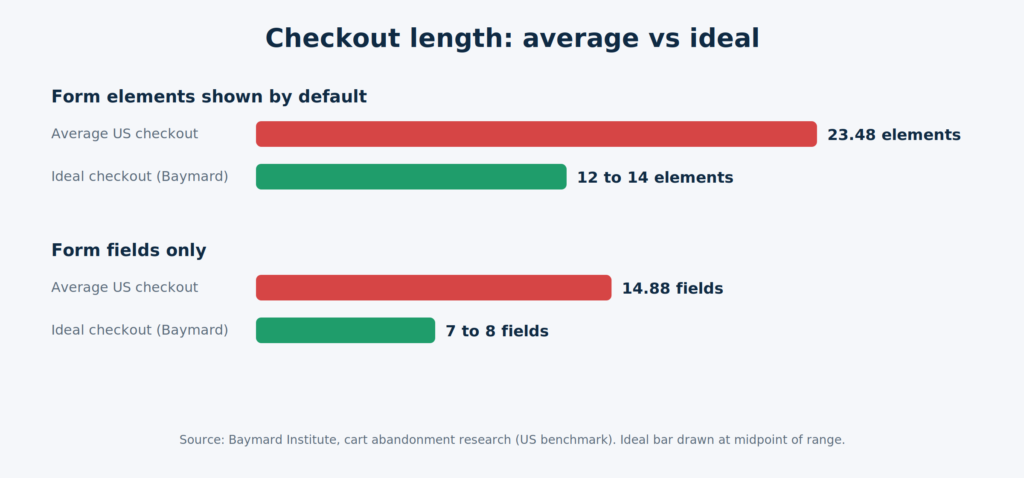
Cut the checkout to the fewest fields you can legally and operationally get away with, and allow guest purchase. Baymard’s testing suggests an ideal checkout can be as short as 12 to 14 form elements (7 to 8 fields), while the average US checkout in its benchmark shows 23.48 elements (14.88 fields). It also found that 18% of shoppers abandoned because the site wanted them to create an account, and 17% because the checkout was too long or complicated.
A trimmed Indian checkout usually looks like this:
- Mobile number first. Use it as the identifier, verify with an OTP, and skip password creation entirely.
- Pincode that fills city and state. One address block, no separate billing address by default.
- A “I need a GST invoice” checkbox that reveals a GSTIN field only for buyers who tick it. B2B buyers get what they need, and everyone else never sees the field.
- The right keyboard for each field. Phone and pincode fields should open a numeric keypad on mobile (the
inputmode="numeric"attribute does this). It’s a small detail that removes a lot of fumbling. - Inline error messages that say what is wrong and how to fix it, not a red banner at the top of the page.
Do You Offer the Payment Methods Your Buyers Actually Use?
Offer the methods your audience already trusts, show them before checkout starts, and handle failure without emptying the cart. In Baymard’s data, 9% abandoned because there weren’t enough payment methods, 10% because a card was declined, and 19% because they didn’t trust the site with card information.

For an Indian store, that typically means:
- UPI (with intent or QR flows on mobile), cards, netbanking and wallets, plus EMI if your average order value is high.
- COD where your margins and return-to-origin risk allow it. If you offer it, say plainly what it costs and consider a small prepaid incentive. That is a business decision, not a design one, but the design must make the choice clear.
- A hosted or tokenised payment form from your gateway. Don’t build your own card fields.
- A graceful failure state. When a payment fails, the message should read something like “Payment didn’t go through. Your cart is saved. Try UPI or another card,” with one button to retry. The cart must survive.
Is Trust Visible, Including What Indian Rules Expect?
Make the basics visible on every page, and add the legal display items Indian rules expect. This part is where generic checklists fall short.
Visible basics. HTTPS across the whole site, a real phone number and email in the header or footer, a physical address, and a one-line returns summary on product pages and in the cart. Baymard found that 13% of shoppers abandoned because the returns policy wasn’t satisfactory, so the policy should be easy to find before commitment, not after.
Consumer Protection (E-Commerce) Rules, 2020. Notified in July 2020 under the Consumer Protection Act, 2019, these rules apply to e-commerce entities, including foreign entities that systematically offer goods or services to Indian consumers. As summarised by law firms, an e-commerce entity must clearly display its legal name, the address of its headquarters and branch offices, its website details, and customer care and grievance officer contact details. The grievance officer must acknowledge complaints within 48 hours and resolve them within one month. Listings need relevant product details including country of origin, and marketplaces must show seller details. Treat this as a design requirement: these items need a home in your footer and your product page template. This is a summary, not legal advice, so confirm what applies to your business structure with a lawyer or CA.
DPDP Rules, 2025. MeitY notified the Digital Personal Data Protection Rules on 13 November 2025, with a phased rollout over roughly 12 to 18 months. Law-firm analyses of the rules point to a consent notice that is clear and distinct from other information, and a way for people to withdraw consent. In design terms, that means a standalone privacy notice at the point of data collection, a consent checkbox that isn’t buried inside “I agree to the terms”, and a visible withdrawal route. The main obligations are expected to apply around mid-2027, so building this into your forms now is cheaper than retrofitting later. Again, confirm specifics with counsel.
Does the Site Work on a Mid-Range Android Phone on Patchy 4G?
Design for the phone your average buyer owns, not the one on your desk. Google’s recommended Core Web Vitals targets, measured at the 75th percentile of real page loads across mobile and desktop, are:
| Metric | What it measures | Good |
|---|---|---|
| LCP (Largest Contentful Paint) | Loading | 2.5 seconds or less |
| INP (Interaction to Next Paint) | Responsiveness | 200 milliseconds or less |
| CLS (Cumulative Layout Shift) | Visual stability | 0.1 or less |
Two things catch teams out. First, lab scores are not field data. Lighthouse runs without a user, so it can’t measure INP at all. Check PageSpeed Insights field data and the Core Web Vitals report in Search Console once you have traffic. Second, INP replaced FID as a Core Web Vital in 2024, so any checklist still listing FID is out of date.
Design decisions that move these numbers:
- Don’t lazy-load your hero or main product image. It is usually the LCP element and should load first.
- Set width and height on every image, banner and embed so the page doesn’t jump as it loads. Reserve space for the cookie banner too.
- Treat third-party scripts as a budget. Chat widgets, review carousels, popup tools and ad pixels are frequent causes of poor INP and CLS. Every new app you install has a cost.
- Cap font families at two and serve images in modern formats at the size they’re displayed.
Baymard also found 17% of shoppers abandoned because a site had errors or crashed. Speed and stability are conversion issues as much as ranking ones. For a deeper walkthrough, see Growthkul’s guide to Core Web Vitals and how to improve your score.
Are the Form Basics Accessible?
Accessibility at this stage is mostly about forms, because that’s where purchases happen. Every field needs a visible label (not a placeholder that vanishes when typing starts), text and buttons need enough contrast, focus states must be visible, tap targets need room, and checkout must be completable by keyboard alone. These are conversion fixes as much as compliance ones. A shopper squinting at light-grey placeholder text on a sunlit phone screen is abandoning for the same reason as someone using a screen reader on a broken form.
Tier 2: How Do You Turn Browsers Into Buyers?
How Should Navigation and Search Work?
Navigation should get a shopper to a category in two taps, and search should forgive how people really type. Keep the top-level menu short enough to scan without scrolling, and make search visible in the mobile header rather than behind an icon in a sub-menu.
Good search for an Indian store has a few specifics:
- Autocomplete with product images and categories, not just text suggestions.
- Tolerance for spelling variants and Hinglish. Shoppers type “kurti” and “kurta”, “sneakers” and “sports shoes”, “mixie” and “mixer grinder”. Map the synonyms your analytics show.
- A “no results” page that helps: popular categories, spelling suggestions and a contact route. Log zero-result searches, because they’re free product research.
- Filters on mobile that behave: a sticky Filters button, applied filters shown as removable chips, and a visible result count.
What Does a High-Converting Product Page Contain?
Everything the shopper needs to resolve their last doubt, in the order they ask it. Use this table as the review checklist.
| Element | What good looks like | Frequent mistake |
|---|---|---|
| Images and video | 5 or more angles, zoom, one in-use shot, a short video where it helps, consistent aspect ratio | Supplier images with mixed crops that make the layout jump |
| Price block | Selling price, MRP and discount, GST inclusion, EMI note | A discount badge with no original price shown |
| Delivery and returns | Pincode checker, estimated date, return window in one line | Buried in the footer |
| Variants | Size and colour selectors that show stock state, plus a size guide | “Out of stock” revealed only after Add to Cart |
| Reviews | Rating summary, photo reviews, filter by variant | Only curated five-star reviews, which readers discount |
| Description | Scannable specs, materials, what’s in the box, care | A wall of manufacturer copy pasted from a catalogue |
| Primary button | High contrast, always reachable, sticky on mobile | Buried beneath a long gallery on small screens |
Add Product structured data. Google’s documentation says Product structured data can let results show price, availability, review ratings and shipping information, and that merchant listing markup relies on specifics like price and availability. Providing both on-page structured data and a Google Merchant Center feed maximises eligibility, and Google may verify merchant listing data before showing it. Eligibility isn’t a guarantee of rich results, so keep the markup accurate and in sync with what’s visible on the page, including stock and price changes.
What About Category Pages and the Cart?
Category pages need consistent image ratios (this prevents layout shift), prices and ratings visible on each card, and fast filtering. A “Load more” button that preserves scroll position usually behaves better than pagination that resets the page.
The cart should answer three questions without scrolling: what am I paying, when will it arrive, and what is the next step. Allow quantity edits, show the free-delivery progress line, offer “save for later”, and make “Proceed to checkout” the one dominant button. As a practitioner observation, a prominent empty coupon box can send shoppers off to hunt for codes, so many stores collapse it behind a “Have a code?” link.
If cart abandonment is already hurting you, pair these design fixes with recovery messaging. Growthkul’s guides on why Indian shoppers abandon carts and setting up cart abandonment emails cover both sides.
Tier 3: What Should You Build After Launch?
How Do You Know Where the Design Is Leaking?
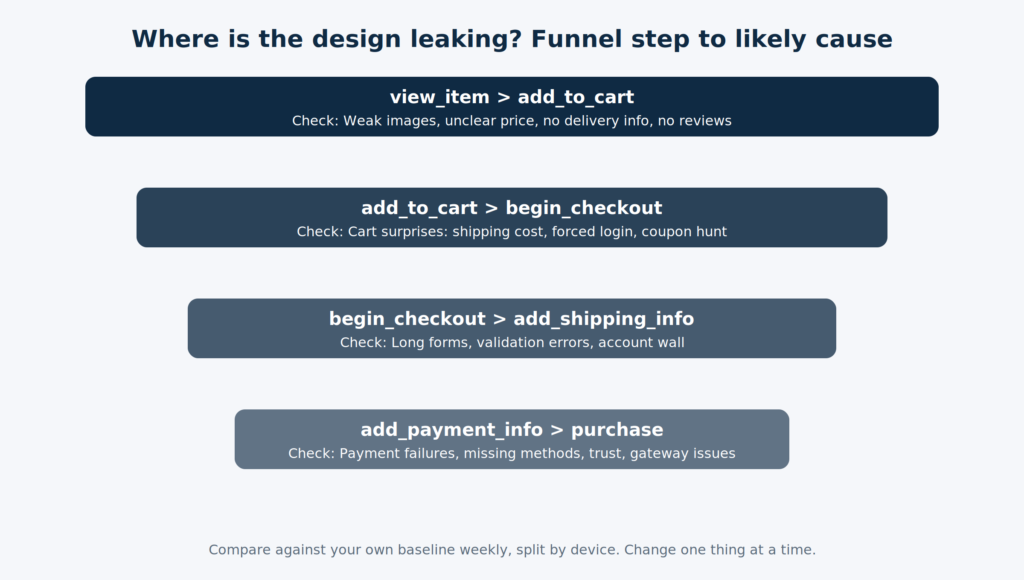
Track the full purchase funnel from day one. GA4 supports recommended e-commerce events (view_item, add_to_cart, begin_checkout, add_shipping_info, add_payment_info and purchase), which are not sent automatically and need to be set up with the right parameters such as currency, value and items. Once they fire correctly, each drop-off points to a likely design cause:
| Funnel step that underperforms | Likely design cause to investigate first |
|---|---|
| View item to Add to cart | Weak images, unclear price, missing delivery info, no reviews |
| Add to cart to Begin checkout | Cart surprises: shipping cost, forced login, coupon hunt |
| Begin checkout to Add shipping info | Long forms, validation errors, account wall |
| Add payment info to Purchase | Payment failures, missing methods, trust, gateway issues |
There is no universal benchmark worth chasing here. Compare against your own baseline week over week, split by device, and change one thing at a time so you know what worked. Heatmaps and session recordings (Microsoft Clarity and Hotjar are common choices) help explain the “why” behind a drop.
What About Search Visibility and AI Answers?
Unique product descriptions and a short Q&A block on each product page, answering the questions your support team actually gets (sizing, compatibility, delivery, returns), serve shoppers first. They also give search engines and AI answer systems clear, extractable facts about your products. That’s an outcome to aim for, not something any markup can promise.
What Happens After the Purchase?
The order confirmation page is part of the design. Show order details, an estimated delivery date and a support link, then send the confirmation by email and WhatsApp or SMS. Build a self-serve returns and cancellation flow before launch, not after the first complaint.
How Do You Test an E-commerce Site Before Launch?
Run real scenarios, not a general “click around”. Use this script and don’t launch until every row passes.
| Scenario | What “pass” looks like |
|---|---|
| Place real orders with every payment method (UPI, card, netbanking, COD) and refund one | Orders reach the admin, stock updates, confirmations send, the refund completes |
| Force failures: cancel a UPI request midway, use a declined test card | Cart stays intact, the message is clear, retry is one tap |
| Try awkward addresses: long lines, a slash in the flat number, an unserviceable pincode | Validation helps rather than blocks, and non-serviceable pincodes are flagged before payment |
| Test on a low-to-mid Android phone, an iPhone, a small-screen phone and a tablet, with Chrome DevTools throttled to slow 4G | Nothing overlaps, taps land, pages are usable on the throttled connection |
| Run PageSpeed Insights on home, category, product and cart pages | LCP, INP and CLS in the good range where field data exists. New sites won’t have field data yet, so recheck after traffic builds |
| Visit the empty states: sold-out variant, empty cart, empty search, 404 | Each is designed and offers a next step |
| Complete a test purchase and inspect analytics | GA4 and ad pixels fire once each with the correct value |
| Check the transactional messages | Confirmation, shipping and return templates render on mobile and reach the inbox |
| Review the footer and checkout for policy links | Legal name, address, grievance officer, returns and privacy notice are all present |
| Complete checkout with the keyboard only | Every field and button is reachable and labelled |
If you’re redesigning an existing store rather than launching a new one, add one more row: build and test a 301 redirect map from old URLs to new ones before go-live. Skipping it is a common way for a redesign to lose search visibility.
Which Design Mistakes Quietly Cost the Most Sales?
- Designing the homepage first and the checkout last. The homepage gets the praise, the checkout gets the revenue. Start from the cart and work outward.
- Stacking popups. A cookie banner, a discount popup, a chat bubble and a notification prompt all fighting for a small mobile screen hurt usability and often cause layout shift.
- Heavy trust widgets. A review carousel loaded as a large third-party script can cost more in speed than it earns in trust. Test with and without.
- Treating a Lighthouse score as a Core Web Vitals pass. They measure different things, and only field data reflects real users.
- Copying a checklist from another market. A list built around card-first checkout and wallets that don’t exist in India will miss UPI, COD, pincode serviceability and local compliance.
- Launching without the legal and policy pages in place. They take a day to write and design properly, and they cost real trust when missing.
Do You Need a Custom Build or Will a Template Do?
A well-configured template handles most stores with a standard catalogue, simple pricing and common integrations. It usually stops being enough when you need B2B price lists, multi-warehouse inventory, product configurators or integrations with ERP and logistics systems that off-the-shelf apps handle poorly. We’ve covered that trade-off in detail in template website vs custom website.
If your requirements land on the custom side, or you’d like the checkout, speed and trust checks above built into the store from day one rather than patched in later, a web design and development team in Delhi that understands Indian payment and compliance realities can save you a rebuild.
The One-Page Version: Copy-Paste Checklist
Tier 1: Launch-blockers
- Shipping, tax and COD fees visible on or before the cart
- Pincode checker with delivery date and charge on product pages
- GST inclusion stated, GST invoice option available
- Guest checkout, OTP login, minimal fields, pincode autofill
- UPI, cards, netbanking, wallets (and COD or EMI where it fits)
- Payment failure keeps the cart and offers retry
- HTTPS, contact details, address, returns summary visible
- Legal name, addresses, grievance officer and customer care shown per the E-Commerce Rules
- Standalone privacy and consent notice, with a way to withdraw
- LCP, INP and CLS in the good range on mobile
- Labelled fields, readable contrast, keyboard-usable checkout
Tier 2: Conversion boosters
- Search with autocomplete, synonyms and a helpful no-results page
- Mobile filters with chips and result counts
- Product pages with the full element set in the table above
- Product structured data matching on-page price and stock
- Cart with totals, free-delivery progress and one dominant button
Tier 3: Growth layer
- GA4 e-commerce events firing correctly
- Funnel reviewed weekly by device
- Confirmation by email and WhatsApp or SMS
- Self-serve returns and cancellations
- 301 redirect map tested (redesigns only)
Conclusion
A store doesn’t lose sales because the hero banner is the wrong shade of blue. It loses them at the moments of doubt: a delivery charge that appears too late, a form that asks for too much, a payment that fails with no way back, a page that stutters on a mid-range phone. Every item above is a way of removing one of those moments.
Work through the tiers in order, run the test script before you launch, and let the funnel data tell you what to fix next. If you’d like a team to build or audit your store against this list, talk to Growthkul about your e-commerce website.