Most B2B landing pages fail for a few common reasons: too many form fields, little or no social proof, multiple calls to action competing for attention, and copy that focuses on the company instead of the buyer’s problem. The average B2B landing page converts at 2.6%. Top performing pages can reach 8% to 12% by focusing on trust, clarity, and making the conversion process easier.
This guide explains what makes these pages work, from their structure and messaging to the design decisions that can help turn more visitors into leads.
Why B2B Landing Pages Are Different from B2C
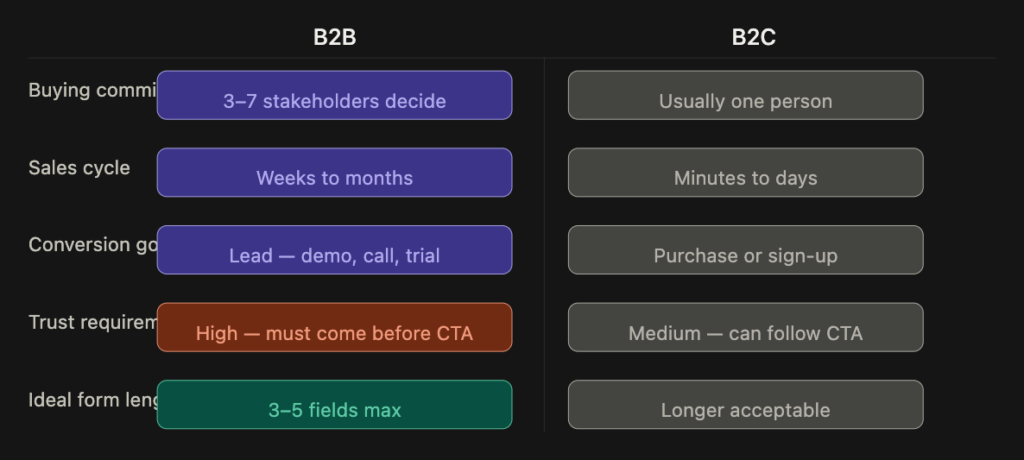
B2B lead generation landing pages face challenges that B2C pages often don’t. The buying committee can include 3 to 7 people, the sales cycle can last weeks or months, and the action you’re asking visitors to take, such as booking a demo or requesting a proposal, involves a bigger commitment than simply sharing an email address.
This changes how conversion works. In B2C, reducing friction can sometimes be enough to encourage an impulse purchase. In B2B, the goal is to make taking the first step feel worthwhile and low risk. Visitors want to know what they’re signing up for and whether they can trust the company before sharing their details.
Every design decision on a B2B lead generation landing page should take this into account.
The Anatomy of a High Converting B2B Landing Page
Above the Fold: The 8 Second Test
Hotjar heatmap data shows that 57% of SaaS landing page engagement happens above the fold. Visitors often decide within a few seconds whether to continue reading or leave. The first section of your page should answer three questions quickly: What is this? Who is it for? Why should I trust it?
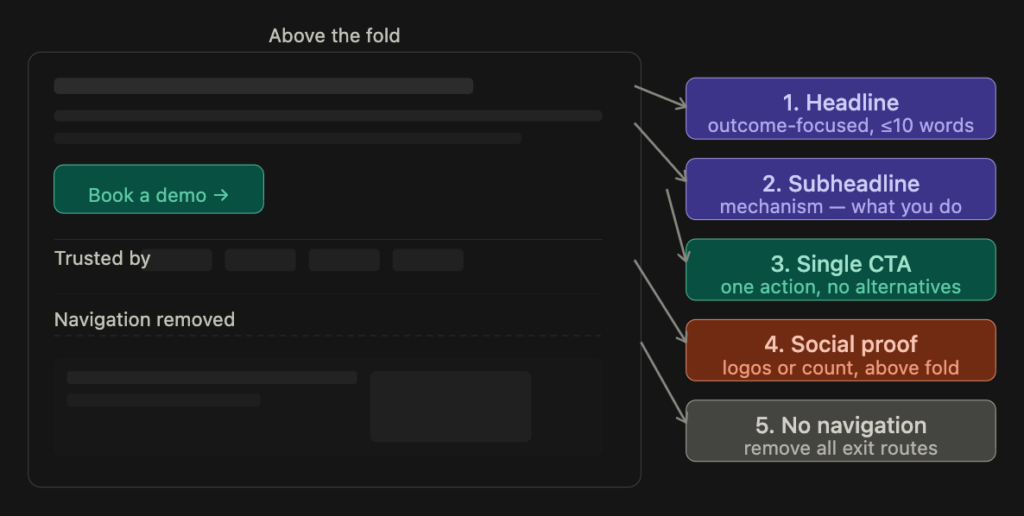
A strong above the fold section for a B2B lead generation page should include:
- Headline: Focus on the outcome and keep it under 10 words where possible.
- Subheadline: Explain what you do and how it helps achieve that outcome.
- Primary CTA: Give visitors one clear action to take.
- Social proof: Show client logos, a G2 badge, or a genuine customer count within the main banner.
Customer counts can also make social proof more convincing. For example, “Join 1,400+ procurement teams” gives visitors a clearer idea of who already uses the product than a vague statement such as “Trusted by thousands of customers.”
The Headline: Problem First, Not Product First
One common mistake on B2B landing pages is describing the product instead of explaining what the buyer gains from it.
For example, “AI Powered Sales Intelligence Platform” describes the product, while “Close 40% More Deals with Less Prospecting Time” focuses on the outcome.
The most effective headline structure is usually outcome + target audience + mechanism (optional).
Here are a few examples:
- “Cut your reporting time in half without changing your data stack”
- “More qualified leads from LinkedIn. Same ad budget.”
- “Stop losing deals in the proposal stage”
Your headline doesn’t need to be clever. It needs to be clear enough that a visitor, or even their manager when they share the link internally, can quickly understand what the company offers.
Form Design: Fewer Fields Convert More
Form length is one of the most important things to consider when designing a B2B landing page, yet it’s easy to overlook.
Research cited in the original article suggests that reducing form fields from from 7+ to 3–5 can increase form completions by 25% to 120%. One example found that reducing a form from 11 fields to four produced a 120% increase in conversions.
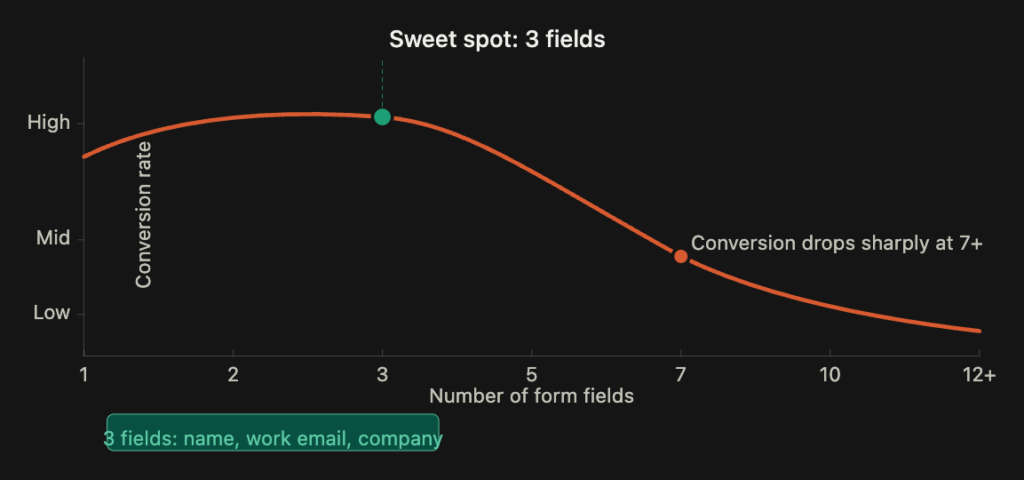
The practical takeaway is simple: every field should have a clear purpose.
For most top of funnel B2B landing pages, a basic form can include just three fields:
- Name
- Work email
- Company name
If you need more information, such as company size, timeline, or specific requirements, you can collect it after submission or during the sales discovery call instead of making it a barrier to the first conversion.
Consider removing fields such as phone number, job title, and “How did you hear about us?” unless they’re genuinely needed. You may be able to collect some of this information through follow up questions, LinkedIn research, or UTM tracking.
Trust Signals: Placement Matters as Much as Having Them
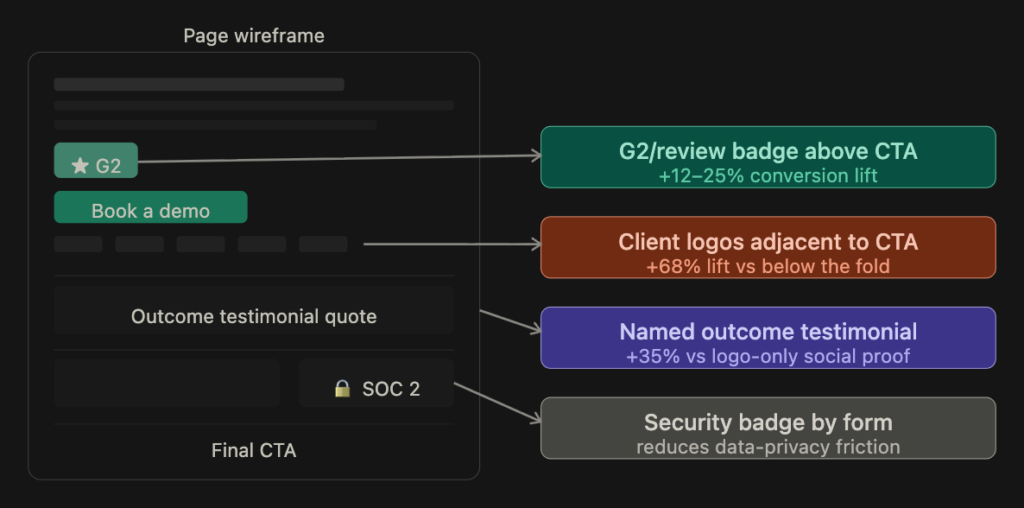
Trust signals help visitors feel more comfortable taking action. But simply adding testimonials or client logos to a page isn’t enough. Where you place them also matters.
The original article cites a median conversion lift of 37% from trust signals, with social proof placed next to the primary CTA delivering stronger results than the same proof lower down the page.
A useful trust signal hierarchy for B2B landing pages is:
- Customer testimonials with specific results: For example, “We reduced onboarding time by 60%.”
- Recognisable client logos: Display five to seven relevant logos near the form where possible.
- Review platform ratings: Use G2, Capterra, or Clutch ratings with the review count.
- Specific customer numbers: For example, “4,200+ teams across 38 countries.”
- Compliance and security badges: SOC 2, ISO, or GDPR related credentials where applicable.
- Press mentions or analyst recognition: Include relevant, verifiable mentions.
Avoid vague testimonials such as “Great platform, really helped us!” Stock photos of happy customers and generic trust badges without a way to verify them can also do little to build genuine confidence.
The CTA: One Action, Repeated Strategically
A landing page should make it obvious what visitors are expected to do next. Giving them several competing options can make that decision harder.
For example, displaying “Book a Demo,” “Start Free Trial,” and “Talk to Sales” together above the fold can divide attention. Choose the action that best fits your sales model and the visitor’s intent, then use it consistently across the page.
Repeat the same CTA at natural decision points:
- Above the fold
- After the value proposition
- After testimonials or client logos
- At the bottom of the page
This way, visitors can take action when they’re ready without having to scroll back to the top.
The wording matters, too. Labels such as “Get My Free Audit,” “See It in 15 Minutes,” or “Show Me the Demo” explain what happens next. Generic labels such as “Submit” or “Learn More” provide less context.
Page Speed: The Silent Conversion Killer
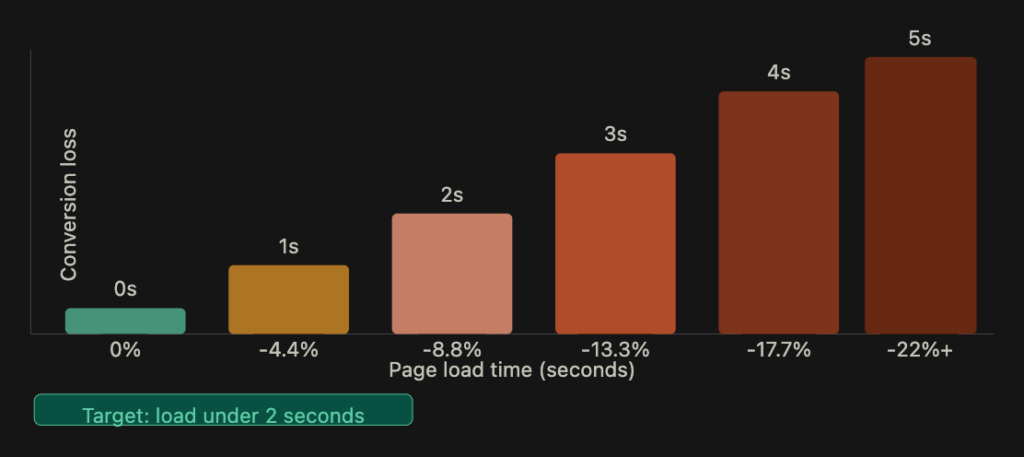
A slow landing page can lose potential leads before visitors even read the headline.
The original article cites research suggesting that conversion rates decline as load time increases from zero to five seconds. A page that takes four seconds to load instead of two may lose a meaningful share of potential conversions.
Some common performance problems include:
- Large, uncompressed hero images
- Too many third party tracking scripts loading at once
- Web fonts without
font-display: swap - JavaScript that prevents the page from rendering quickly
If paid advertising drives a significant share of your traffic, improving page speed is worth prioritising. Visitors who click an ad expect the landing page to load quickly and deliver the information promised in that ad.
B2B Landing Page Design by Goal Type
Not every B2B landing page has the same purpose. The design should reflect the action you want visitors to take.
Demo request pages
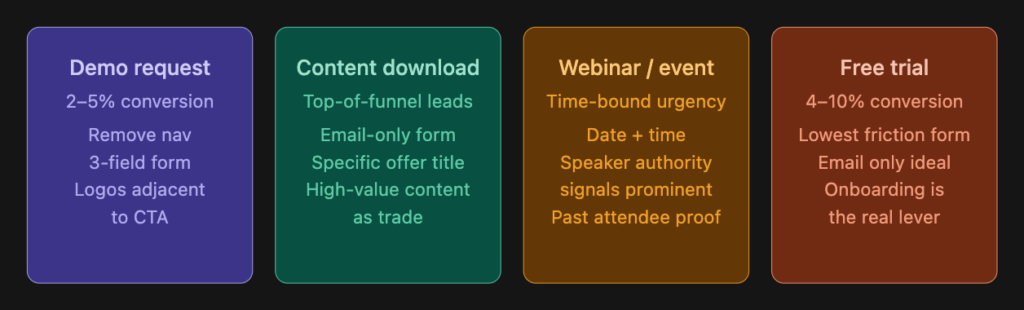
These pages are designed to get potential customers to book a product demo or sales conversation. A strong page includes an outcome focused headline, a form with three to four fields, social proof near the form, and a short list of key benefits. Removing the main navigation can also help keep visitors focused on the booking action.
Content download and lead magnet pages
These pages capture leads by offering something useful, such as a whitepaper, guide, checklist, or industry report. The offer should be specific enough to communicate its value. For example, “2026 B2B Pricing Benchmark Report” tells visitors more than “Download Our Guide.”
A shorter form, sometimes asking only for an email address, can make sense here. The content should provide enough value to justify asking visitors for their details.
Webinar and event registration pages
For these pages, the event date, time, and speaker credentials should be easy to find. The fact that the event takes place at a specific time can encourage visitors to register, while testimonials from previous attendees or relevant speaker experience can help build trust.
Free trial and self serve pages
These pages usually ask for a smaller commitment because visitors can try the product themselves. Keep the signup process simple and avoid unnecessary form fields. After signup, the onboarding experience often plays a major role in turning trial users into paying customers.
What B2B Landing Pages Get Wrong
Navigation links that let visitors leave. A landing page has a specific conversion goal, unlike a general website. Removing the main navigation can reduce distractions and keep visitors focused. If brand recognition matters, you can retain the logo without linking it to another page.
Headlines about the company instead of the buyer. “We are a next generation B2B data enrichment platform” focuses on the company. “Fill your CRM with verified contacts without manual research” explains the benefit to the buyer.
Generic social proof. A testimonial such as “This has been a game changer for our team” doesn’t explain what actually improved. A statement like “Our lead response time dropped from four hours to 11 minutes,” attributed to a real customer, gives visitors something specific to evaluate. Only use results and testimonials you can verify.
A mismatch between the ad and landing page. If a Google Ad promises a free B2B lead generation audit but the landing page focuses on product features, visitors may leave because the message doesn’t match their expectations. The landing page should continue the same conversation started by the ad, email, or link. Where different campaigns target different audiences, consider creating separate landing page versions.
Ignoring mobile visitors. B2B decision makers also browse LinkedIn, read emails, and click links on their phones. Make sure the page works well on mobile, keep forms short, use touch targets of at least 44 pixels, and check loading speed on a mobile connection rather than relying only on office WiFi.
The B2B Landing Page Conversion Checklist
Use this checklist before publishing a landing page.
Above the Fold
- The headline focuses on the buyer’s desired outcome.
- The subheadline explains how the offer delivers that outcome.
- There is one primary CTA.
- Social proof is visible without scrolling.
Form
- The form has five fields or fewer, ideally three.
- A work email field is used where appropriate.
- A phone number is requested only when necessary.
- The form explains what happens after submission.
Trust and Credibility
- Client logos or named testimonials appear near the CTA.
- At least one testimonial includes a specific, verifiable result.
- Review platform ratings are included where available.
Page Structure
- Unnecessary navigation has been removed.
- The primary CTA appears at least three times across the page.
- There are no competing calls to action.
- The page loads in under two seconds, where achievable.
Mobile
- The page loads correctly on mobile devices.
- Form fields are easy to tap without zooming.
- Social proof is visible near the top of the mobile page.
If your landing pages are getting traffic but not generating enough leads, the problem may be the messaging, form length, trust signals, or overall user experience rather than the visual design alone.
Growthkul provides web design and development services for B2B businesses in Delhi NCR, with a focus on building landing pages around conversion from the initial wireframe rather than treating it as an afterthought.